
Today our team was working as a group on a conference call, spinning up a lab with Data Domain Virtual Edition (DDVE) and Avamar Virtual Edition (AVE) when we ran into a little snag.
We were using a shared lab resource, which came with a VMWare instance and other resources, to which we didn’t have complete admin control. As part of the tasks at hand, we were deploying DDVE and AVE as OVAs. (How’s that for acronym soup?)
We started with DDVE first, which deploys by default with its network interface set to acquire an IP address via DHCP. Since this is a shared environment (remember, we don’t have full admin control), we couldn’t get a DHCP service up and running to dole out IPs. No IP address on DDVE makes it pretty darn difficult to connect to it for administration/configuration purposes. Furthermore, you couldn’t connect to the DDVE to change it to static because you need to putty to it initially. Again, no IP = no bueno. Classic “what comes first, chicken or egg” scenario. What to do?
Well… Using this PowerShell script, you can configure the DDVE box to a static IP configuration AND configure its addressing. So off we ran attempting to get the configuration changed so that we could proceed with the install. Of course, this didn’t exactly go off without a hitch either. The minute we attempt to run the script, we’re presented with this little problem:
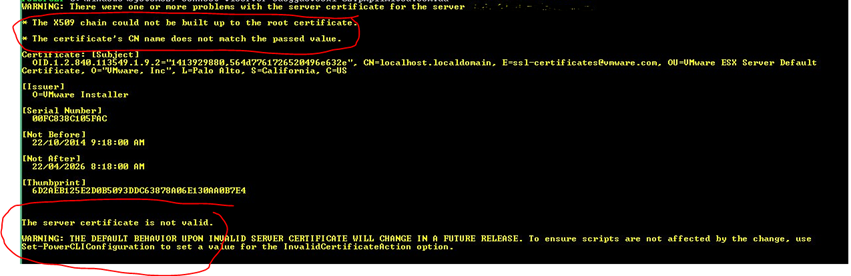
The vCenter instance we were running in the lab environment had the default certificates installed. Since these are self-signed certificates, they don’t pass validation checks, and as a safety precaution, the script fails to run. Remember, we don’t have full admin rights to this vCenter instance, so it’s not something we can fix.
But all is not lost… this error can be suppressed!
By running this handy little command, you can suppress the certificate warning for the duration of the PowerCLI session:
Set-PowerCLIConfiguration -InvalidCertificateAction ignore -confirm:$false
After suppressing the error, and running our PowerShell script to configure the IP addressing, we were up and running.
Happy scripting.
Categories: Data Domain, DDVE, Scripting, VMWare
 Tech Barton
Leave a comment