
How is it possible that my report is showing that I have more data stored than what is physically available?? This was a question prompted by one of my customers. But first, a little background.
For those of you that are unfamiliar with Data Domain, it is a deduplication storage system by Dell EMC (#iworkfordell) specifically designed for data protection workloads. It GREATLY reduces the amount of disk storage needed to retain and protect data by ratios of 10-30x (or GREATER) while scalling up to 150 PB (that’s with a “P”) of logical capacity.
However, one important concept to understand is how you can organize data that is stored on Data Domain. First, if you preferred, you could configure Data Domain for secure multi-tenancy allowing you to isolate and securely store the backup data for multiple tenants. Each tenant has logically secure and isolated data on the Data Domain system. Within those tenants, you can create tenant units that allow you additional logical organization and management such as quotas and role administration. Additionally, data is stored in what we call MTrees, a logical grouping of data that gives you granular management of snapshots, quotas, Retention Lock and the like. Within those MTrees, you can create folder structures for further logical grouping of data.

Should you decide to forego multi-tenancy, you will still use MTrees for storage of data on the Data Domain. That’s about all you need to know for the purpose of this post. Since this post isn’t a Data Domain primer, you can read more about Data Domain at https://www.dellemc.com/en-us/data-protection/data-domain.htm.
With that said, and since data is written, deduplicated and compressed to the Data Domain, many customers want to see how much physical storage the data is consuming. This becomes especially true in situations where customers want to chargeback to the users of the system. Still, one of the best ways to charge a consumer is on consumed space. Some customers want to chargeback for logical capacity, the amount of data being protected (BEFORE deduplication and compression) while others want to charge back for physical capacity (AFTER deduplication and compression). Therefore, how do you determine how much space that they’re using if you want to charge them based upon physical consumption since it is deduplicated and compressed? Enter: Physical Capacity Measurement, or PCM for short. (As a side note, in newer documentation, it’s referred to as Physical Capacity Reporting or PCR, however, for the sake of older documentation, I’ll refer to is as PCM).
PCM has the capability and gives you the ability to measure, as the name implies, the physical consumption of the data. This allows you to perform efficient chargeback/billing, but can also assist in capacity planning, migration planning, and even help identify individual datasets that are not achieving a high degree of deduplication efficiency. The reporting that PCM provides, can not only be performed at the Tenant levels, but even at MTree AND subsets of an MTree. This gives you quite a bit of granularity in your reporting.
Here comes the caveat.
Data Domain Physical Capacity Measurement measures the physical capacity consumed by a subset of files, within the file system, based on how the files in the subset deduplicate with other files in the subset. Huh? What the heck do you mean? Put another way; it measures the physical capacity that would be consumed on a Data Domain system by a set of files, if that set of files were the only files on the Data Domain system. So if there appears to be additional data (that’s not really there) it’s not a Jedi mind trick.
Data Domain inline deduplicates data segments as data is being written. If you have a deduplicated segment that is referenced by 3 MTrees it will show up on the report for each of those MTrees. From a capacity standpoint, if you were totaling (summing) the capacity reported by PCM for each MTree, you’ll count that same deduplicated segment of data 3 times. This is an important distinction, especially when it comes to multi-tenancy. It has to be counted on each report (regardless if you’re doing it for tenant, mtree or sub-mtree) – otherwise, in a chargeback model, the guy who initially wrote the data would pay and the others not.
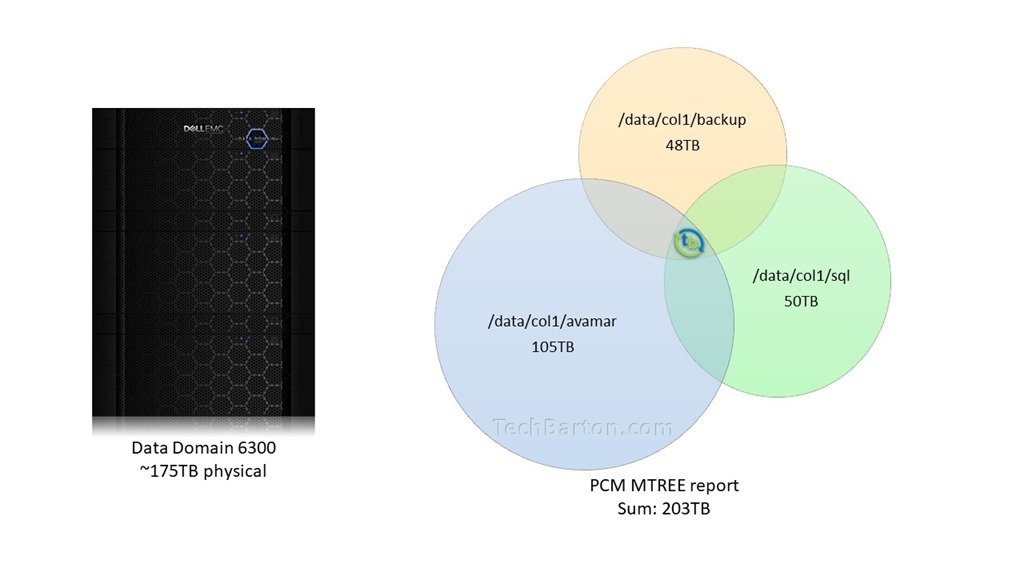
Here’s where my customer had his issue. He was looking at the PCM report that were ran on individual MTrees. Since there is, what I like to call, “deduplication overlap”, he summed his MTrees, and in his case, totaled more than the physical capacity of his Data Domain model. Can you see why it initially left him scratching his noggin?
Want more information? Check out this whitepaper on Physical Capacity Measurement.
On another note, I’m sorry I haven’t blogged in a while. A New Year’s resolution for me is to blog more. Hey, it’s better than giving up Krispy Kreme donuts.
**UPDATE**
If you’re JUST NOW reading this, check out my followup post, Checking the List and Counting it Twice, where I explain a little further.
**UPDATE**
Categories: Data Domain
 Tech Barton
Leave a comment