
Avamar and Data Domain integration have been around a while and is a tried-and-true solution that’s been put through its paces and is still in the lead of backup solutions (according to Gartner). As virtual editions of both products are available now, Avamar Virtual Edition (AVE) and Data Domain Virtual Edition (DDVE), I am seeing more and more customers implement these virtual solutions, either together or with their hardware counterparts. As they implement these in testing environments in order to “kick the tires”, I have seen one common mistake made during installation. In order to explain, you must first understand how these two products work together (and a little bit of history).
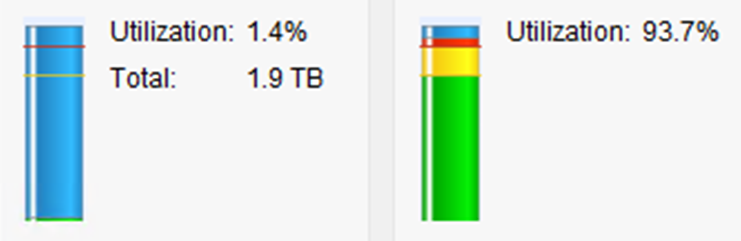
What you DON’T want to see:
A brief refresher: Avamar was created as a source-side deduplication solution where data was stored on one or more Avamar hardware nodes. Using Avamar alone (without Data Domain), the backup client runs an Avamar agent and during an initial full backup, stores the backup data on the Avamar node. During subsequent backups, only changed data is sent to the Avamar node for storage. This GREATLY reduces the amount of data that needs to be sent across the network and GREATLY speeds up the backup process.
When integrated with Data Domain, the process is similar with the source-side deduplication, but where the data lands is different.
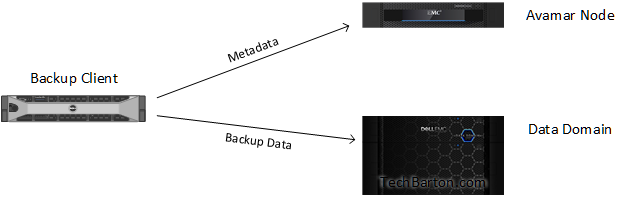
With an integrated Avamar/Data Domain solution, only metadata for the backup is stored on the Avamar Node. This consists of a very small amount of information about the backup and takes up a very small footprint. The bulk of the backup data is sent to Data Domain for storage. In addition to the source-side deduplication of data, your solution now takes advantage to Data Domain’s superior global deduplication of data that lands on Data Domain. In other words, not only does Avamar do the sourceside deduplication of data that’s being sent, but Data Domain deduplicates the data being backed up across all of the backup clients. Backing up a ton of Windows Servers? Why store the same Windows directory from all of those servers? This is *the most efficient* storage of backup data on the market, bar none.
The way that data is stored is identical with virtual editions of the product as well. Having the bulk of your data land on Data Domain instead of Avamar (as in the case of a stand-alone Avamar grid), you don’t need as much storage in the Avamar Node(s). One big benefit is that you can now manage capacity on the Data Domain side of things. Experiencing a large amount of growth? Adding storage to Data Domain is a breeze.
Okay, so now that we have the background information out there, let’s talk about the common mistake I am seeing. When implementing this type of a solution, most customers take advantage of Dell EMC services or the services of one of our partners to install/configure the solution. As part of this process, there are steps taken to ensure that the backup data lands on Data Domain and not on Avamar. However, since some customers are downloading and implementing Avamar Virtual Edition, they may miss a common step that our professional services/partners take care of. Even though you may have implemented and integrated Avamar and Data Domain, you have to specify in your backup policies that you want the backup data to land on Data Domain. If you create a new backup policy, and you do not specify this, the default location is on the Avamar node. I won’t go into a long, drawn-out reason why this is a bad thing, but the short of it is: you could inadvertently fill up your Avamar node. If you want a more detailed explanation, hit me up.
During initial implementation, you can specify that you want ALL backups to go to Data Domain. There’s a way that you can lock this down so that you can’t go wrong with where the data lands. It involves a configuration change to Avamar and must be accomplished via CLI. Again, this must be done during initial configuration if you truly want the most efficient use of Avamar storage and to ensure that no backup data lands on the Avamar node (and only metadata gets store there).
1. Login to the Avamar utility node command line ssh as user “admin” and load proper ssh keys.
2. Change to directory:
cd /usr/local/avamar/var/mc/server_data/prefs/
3. Backup current mcserver.xml file (where YYYYMMDD is the current year, month and day):
cp -p mcserver.xml x-mcserver.xml-YYYYMMDD
4. Edit the file:
vi mcserver.xml
5. Search for the line similar to:
<entry key=”dd_only_mode” value=”DATASET” />
6. Modify the value to “ALL” so that the line now looks like:
<entry key=”dd_only_mode” value=”ALL” />
7. Save and exit file.
8. Restart the MCS:
dpnctl stop mcs
dpnctl start mcs
9. Verify all services are up and running with:
dpnctl status
10. Take a MCS flush or backup:
mcserver.sh –flush
11. If no errors or issues seen in the flush command, logout of command line.
With this configuration, all new policies will default to Data Domain for storage and will not allow you to write them locally to the Avamar node.
Categories: Avamar, AVE, Data Domain, DDVE
 Tech Barton
Leave a comment