
Was in the process of helping a customer install an Avamar NDMP Accelerator node (Gen4T) and ran into a small DNS issue.
As part of the initial configuration, we went into the YaST Linux configuration page to set IP addressing, including DNS servers, default gateway, blah blah blah.
We finished configuring it all, saved the configuration, did a quick ping test from another host and we’re off and running. We continued on to the rest of the installation, however, once we got to the software installation, it asked us to provide the name (or IP) of the Avamar server. It also asked for the “resolvable name” or IP of the NAS device we’d be backing up. Being good stewards of the network, we opted for resolvable names (FQDNs) INSTEAD of IPs. (You don’t hardcode IPs do you?)(Better not).
Up to this point in the installation, we had been using IP addresses for moving files around, pinging, etc, but once we got to the configuration, we chose names. Since this was the first time we used names, it was the first time that we noticed something was awry with name resolution. We checked everything twice and some things we even checked three times. Did we put in the right DNS addresses? Could we ping the DNS servers? Did we mistype the names? We checked EVERYTHING. You name it. (pun intended).
It wasn’t until we double-checked the IP configuration of the Avamar NDMP Accelerator node that we found the problem. Upon running vi /etc/resolv.conf we found:
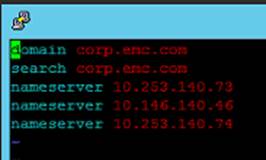
Wait? What? “I know we changed that in YaST!” We even went back in there TWICE previously in our troubleshooting checks. Before modifying, we went back in AGAIN to check. Sure enough, in YaST, we saw the customer’s DNS servers (sorry for the crude emulation):
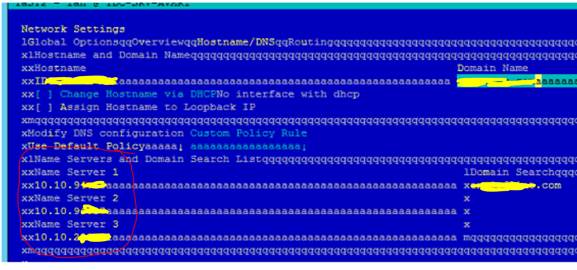
Notice how the name servers in the black box above are completely different than the ones in the blue (YaST)? In fact, the config in the black is the default config from the factory.
We modified the config with vi and applied the changes. Voilà, name resolution worked and we continued with the install.
Cheers,
-M
Categories: Avamar, Networking
 Tech Barton
Leave a comment